Monday, June 15, 2015

CSWP Segment 1: Equations


In this entry, we’ll discuss equations and variables.  By using variables, you can assign a dimension to multiple features or sketches and update them from one location.  This is much easier than trying to remember in your model where the dimension 15mm occurs.  Also, an equation in SOLIDWORKS is a very powerful tool.  You can control parts and have them automatically update in regards to new dimensions or updated dimensions in a design.

Segment 1 uses variables and equations throughout the test.  Before we begin the exam, let’s turn on two features in SW that will come in handy.  If we go to Tools/Options – System Options then Feature Manager, we can set Equations and Sensors to ‘Show’.  This will populate both in the design tree so we can easily find it when we are working on our test.  We will discuss Sensors later in the blog.

Now when we start a new part, in the feature tree, we can see both of these options. 

When we start our test, we see that we are given some variables and further into the test, we are given an equation.  Let’s look at how to enter these variables and equations before we even start modeling.

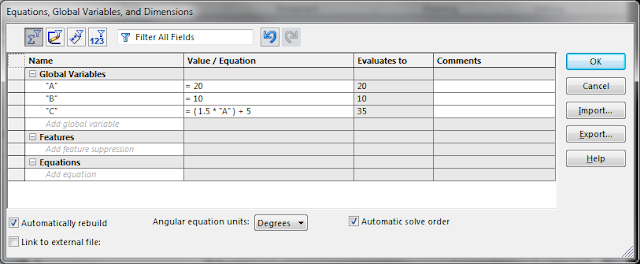
We will start a new part, right click on the equations folder and select ‘Manage Equations’.  This will open up our equations dialog box.  Under Global Variables, type the letter A. Tab over to Value/Equation and give it a value of 20.  Hit the Enter Key and it takes you to the comments box.  In a real world application, you can give this variable a description so that people after you know what it is.  For the purpose of the test, there isn’t much value in this field.  If you hit Enter again, it drops you to a new line under “A”.  Now set B equal to 10 and start a third line.  On the third line, we are going to set C equal to the equation (1.5*’A’)+5.  You will notice at the bottom of the equation manager that there is an equation section.  This is for a direct application of an equation to a dimension.  While it is not needed for the exam, you can double click a dimension and apply an equation to it from directly in the model.  The equation will be displayed here.  Let’s also check the ‘Automatically Rebuild” box.  We can now click OK and close out the equation manager dialog box.


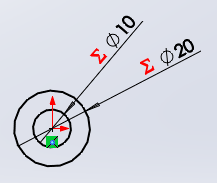
Let’s start our part on the top plane.  Select this plane and start a sketch.  On this plane, we will sketch two circles with the center on the origin, one slightly bigger than the other.   Put a dimension on both, the value does not matter at this point.


Double click the dimension for the inner circle (32.27 above).  If we type =A in the dimension, we can now link this dimension to the variable A.


Click the check and repeat the process for the second dimension, linking it to B.

You will see that we now have our diameters linked to our variables and SOLIDWORKS is show us a new symbol (Red Sigma) that means we are linked to the equations manager.


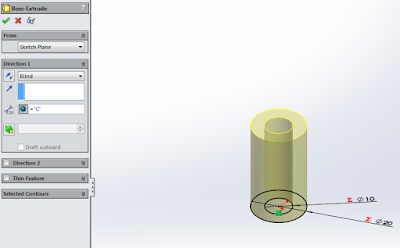
Now, let’s extrude this part.  Select the Features tab, click Extrude Boss/Base and in the Direction one boss, set D1 equal to C.  Click the check mark and we have a part!

Why is this important?  On the exam, the variable will change.  The variables are also used multiple times in the exam.  This is done to force you to show your knowledge of how to use them.  It’s much easier to change A in the Equation Manager rather than sift through your models and find every instance of A.

If we open the equations manager again by right clicking on equations and selecting manage equations we can change these variables.  Let’s change A from 20 to 30.  Move the equations manager off the model so you can see what happens when you click ok.

Our part changed from this:
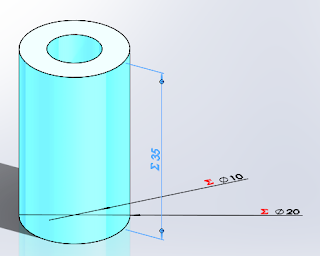

To This:


Diameter A updated from 20 to 30 and Length C updated to from 30 to 50.

If you have any questions on equations, post them below and we will discuss them.

Next time we’ll talk about materials and mass.

Bryan

Tuesday, May 19, 2015

Free Certification Exam

This one is hot off the press.

Richard Doyle just announced that they have partnered with the Certification team to give anyone that attends a SOLIDWORKS User Group meeting between June 15 and August 15, 2015 a free exam for CSWA, CSWP or CSWPA.

Folks, that's a 99 dollar bill put right into your pocket!

Here are the details:
  • Open to all attendees of a summer SOLIDWORKS User Group meeting (June 15th - August 15th)
  • Attendee must be physically present at a user group in order to receive a free SOLIDWORKS Certification exam voucher
  • Attendee will ask the user group leader for ONE free CSWA, CSWP or CSWPA voucher and provide his name and email address to user group leader
  • User group leader will send the list of names and email addresses to Certification Team
  • The SOLIDWORKS Certification team will send special test vouchers and instructions to attendees for the requested exam. 
  • Vouchers will expire one month from the date they are sent to the attendee
  • Find a Group here:  http://www.swugn.org/swugn/directory.htm
To make sure your SWUGLeader is in the know, you might want to have this blog on your phone to show him or have him contact Richard.

Ready, Set, SWUG!!!
Bryan

Wednesday, May 13, 2015

Marie’s Tips to Passing the CSWP Exam

So, I am departing from the norm on this post.  Marie Planchard, Director of Education Community, SOLIDWORKS presented at our SWUG meeting last night.  She makes an awesome presentation on education and SOLIDWORKS.  If you can snag her for a meeting, I highly recommend it.

Part of her presentation as the title suggests was Tips and Tricks.  With her permission, I'm posting them below.  I'll start getting into mine in the next few posts, but I wanted to share hers with everyone.  I've added my comments in { } to help clarify things that she said verbally.

Thanks Marie for your support of Education, Certification and SWUG. 

Bryan

  • Use Global Variables and Equations
  • {watch} Number of Decimal Places (Precision) 
  • The first multiple choice is right on
  • Read the next series of problem variables carefully {They change}
    • Problem 1: A=110
    • Problem 2: A=120
    • Problem 3: A=135
  • Reference Coordinate System - Know the Direction of X and Y axis
  • {be familiar with} Width Mate and Angle Mate
  • Material - exactly {if it says Aluminum 6160, don't use plain Aluminum}
  • {Understand} Mass Properties - Mass, Moment of Inertia based on material
  • CSWP = passing 3 parts of the exam

Monday, April 27, 2015

CSWP Segment 3: Flow and Tips

So let's talk this time about the flow and some tips for Segment 3.  The good news is there is little modeling in this section.  The bad news is some of the material is not stuff that I knew off the top of my head.  Once I figured it out, they were some fairly simple concepts though.

We are going to start off this segment by modeling a part.  Nothing fancy, but be careful, when you have it completed, it asks the mass and is a fill in the blank question.  There is a check, but not until the next question...

You are going to then download a part and make an assembly of this part and the part you modeled for the previous question.  It will then ask you for the Center of Gravity (Center of Mass).  This question is Multiple Choice.  As long as you put the two parts together as they tell you and the origin is located in the place they tell you, then you should get an answer that exactly matches one on the test.  If you do, you can be reasonably assured that you properly modeled your part.  If not, I would suspect the part from question 1 is not quite right.

You are then going to download and add another part and answer the COG again.  The answer is Fill in the blank.

Next comes a technical move.  You are going to rotate one part until it hits another part.  Once it hits, you are going to measure the angle between two surfaces.  This is a Fill in the Blank question.

Download another part and tell what the mass is, again, fill in the blank.

Change gears for the next question.  Model up a part, download another part and make a subassembly out of these two parts.  This is a multiple choice question asking for the mass.

Download a third part, add it to the subassembly, then add the entire sub assembly to the first assembly.  You need to know how to make a subassembly flexible on this one.  They ask what the COG is and it is a fill in the blank question.

Download a part, add it to the assembly, what is the COG? (Multiple Choice)

Download a part, add it to the assembly, what is the mass? (Fill in the Blank)

Model a part, add it to the assembly, what is the COG? (Fill in the Blank)

That's a lot of assembly work...  Now, take your whole assembly and evaluate it for interference.  List all the parts that exhibit interference.  This is a multiple choice with multiple answers (check all that apply)

The final question is to take your original part and replace it with a downloaded part, than answer one last time, what is the COG?  (Fill in the Blank)

We will get into how to do the things above in a later post, but here are some tips to think about. 
  • If question #2 is wrong, you most likely did something wrong in question #1.  If so, please don't forget to fix the answer on Question 1...
  • I think on every test, it says that the part origin is arbitrary.  My advice is to treat it like it is not on every test.  On this one, it will bite you, because the COG is generated about the origin, right?  If your origin isn't in the same place as the origin on the test, there is no way you can get the question right...
  • Know your mates.  Width, Parallel, Perpendicular, Dimensional and Angular are popular on the exam.
  • In the how to section, we'll get into collision detection, flexible assemblies, interference detection and how to replace a part with another.
Stew on this for a bit.  Next time, we'll start with segment 1 showing you some of the skills you need.  As always, if you have any questions, let me know by posting them below.

Thanks,

Bryan

Friday, April 17, 2015

Of Mice and Navigators


I got my hands on their new CAD Mouse about a month or so ago and a couple people I know at work and outside have been trying them out.  That got me to thinking about mice and 3D mice as a tip for certifications.  I have a Space Pilot Pro and now a CAD Mouse, both from 3DConnexion.  


I'm a big fan of the new CAD Mouse.  Not only is it great in SOLIDWORKS, but it also has functionality in other programs.  The software that comes with it recognizes what application is active and you can program buttons based on the application, so I can click on Outlook, hit one of the programmed thumb buttons and a new email starts.  It even has a button that brings up a feature similar to the SOLIDWORKS wheel and has features programmed that are application relevant.  It is a three button mouse with a wheel and you have to hold it between your pinky and thumb, which takes some getting used to.  I found that it took me about 2 weeks to get comfortable with the new grip and using the ring finger to use the RMB.

You will note I’ve added a couple of banners to my blog post for 3DConnexion.  If you are interested in buying one, I’d like to ask that you use the banners to do so.  3DConnexion will send a portion of any sales the banner to help pay for the blog.

If you have any questions or comments on 3D mice or the new CAD Mouse, please post them below.  I’d like to hear what you think.

Best of Luck,
Bryan

Friday, April 3, 2015

CSWP Segment 2: Flow

I like to have fun with this section in my presentations, please read this post knowing that I am smiling and laughing with you.  They say that 72.8% of all statistics are made up on the spot.  Segment 2 is 93.478% about configurations.  There are some questions involving a shell at the end, but in my opinion, that section is mainly about design intent.  I'll touch on it at the end.

Let's talk about how this segment flows.  This segment starts of with one of the easiest questions I have ever had on a certification.  IMO, even easier than 'Are you ready to begin'...

You are going to load a part that they provide to you.  You are going to change to the configurations tab and tell them how many configurations there are.  And to make it even easier, it's going to be a multiple choice question.  I deal with configurations all day long, this one was so easy for me, it scared me.  Be calm though, it is not a trick question.  :-)


The second question will ask you to switch to another configuration and enter the mass as a fill in the blank question.  If configurations aren't your cup of tea, it's as simple as double clicking the configuration you want.  So far, it's been simple, right?  Let's start cranking up the heat.


Now let's add a new configuration.  The test will tell you to switch to a certain configuration.  It will then tell you to make a new configuration based on the active one.  You accomplish this by right clicking the part name at the top of the configuration tree and selecting 'add configuration'.  Give your new configuration a name and hit the check mark.  Now you are going to need to make a change to this configuration.  You will need to find the mass and report it on the test.  This is a multiple choice question.


So the next question is what I like to call suppression control.  It's going to ask you to suppress/unsuppress the new feature from the previous question in another configuration, change to that configuration and report the mass.  It is a fill in the blank question.  You can switch to the configuration and make the change or you can use the configure feature function in the design tree by right clicking the feature and selecting 'configure feature'.


The final question on the configurations portion involves design tables.  A lot of people freak out about this question.  Design tables are nothing to be scared of.  They are very easy to create and are an incredibly powerful tool for creating multiple configurations very quickly.  The test will ask you to create a design table, this is done by going to insert, table, design table.  The test will tell you what options to select and when you have, just click the check mark.  SW will find all the configurations present and automagically (that's Biz Markie reference, not a typo) populate all dimensions that are different in any two configurations into an Excel table in your UI.  To make a new configuration in a design table, just copy the entire row they designate and paste it at the end.  Change the configuration name to what they tell you and modify the dimension value the tell you to.  Then just click outside the Excel table window and SOLIDWORKS will start jumping through hoops (seriously, it starts jumping around) and a new configuration is born.  The only thing you have to do now is fill in the blank on the mass.

The last questions on this segment deal with design intent.  It's also the most difficult topic to explain to someone.  There are entire college courses on this topic.  The easiest question to explain this on is this one:  They give you a part that is shelled.  They then ask you to put an angular cut on the part.  If you put the cut at the end of the design tree, it cuts a large hole in the part.  This is obviously not what they want given the pictures.  You have to understand the design intent is for the shell to be a uniform thickness all the way around the handle.  The solution is to put the cut before the shell operation.  You have to understand how the part is built to accurately modify this part.


Before
After
I'll cover my tips on this section next time.

Have fun,

Bryan

Thursday, March 26, 2015

CSWP Segment 1: Flow and Tips

As I said last week, we are going to look at the flow of the exam on this post and I'll throw in my tips to make it easier.

The information on the exam is given in 2 formats, graphical and written.  You need both to properly execute the exam.

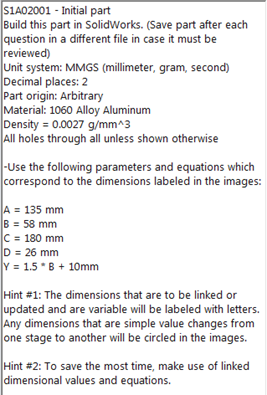
The graphical information is given much like the image to the right, with dimensions, section views, variable dimensions, etc.  Much like you would see on a sketch when coming out of a design review.


In the written portion, there is more detailed information that applies to the physical attributes of the model and defines the variable in the graphical portion.  Here you will find the unit system, variable dimensions, material, number of decimals that they want the answer in and where the part origin is located at.  This segment is one of the few times where I agree that the part origin is arbitrary.  Any time you are dealing with Center of Gravity, it is not.  Please keep that in mind.

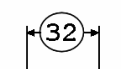
Another way the exam delivers variables is with a  dimension that is circled in the graphical views.  Be on the lookout for them as they will change sometime during the test.


Let's look at the flow of the exam now.  It is 5 questions.  You must get 85 points to pass and there are 115 points on the exam.  You have a 90 minute time limit.  By the way, when you start this exam, the clock does not pause.  If you lose internet connection, somewhere, the clock is still running.  If SOLIDWORKS crashes (I know that never happens), the clock is still running...

  • Model a part from scratch, answer what the mass of the part is, this is a multiple choice question.
  • Modify the previous part slightly (variables). Answer what the mass of the part is.  This is a fill in the blank answer.
    • Non U.S. people, please be careful.  Is 1,000 one thousand or one?  On these exams, the comma (,) designates groups of 3 in a number, not a separator from whole numbers and partial (decimal) numbers.  1mm to 2 decimals should be entered as 1.00 NOT 1,00.
  • Add some features to the previous part. Answer what the mass of the part is, this is a multiple choice question.
  • Make some significant modifications to the previous part. Answer what the mass of the part is, this is a multiple choice question.
  • Modify the previous part. Answer what the mass of the part is.  This is a fill in the blank answer.
5 simple questions, right?  If only, it were...  Here are some tips to help you out.

  • When you start, the first thing you should do is browse through all the questions.  You can go forward and back through them as you need.  Know how this model is going to change.  That will help you lay out your design intent.
  • When you model, sketch and model it exactly as shown.  One of my students did some quick math in his head once and instead of dimensioning a feature 75mm from the bottom of a 100mm part, he dimensioned it 25mm from the top.  When that dimension changed, he was forced to do more calculations in his head.
  • Use linked values for the variables.  You do not want to go searching through your sketches for all your variable dimensions.  It is much faster and easier to change them in the equations folder.
  • Understand how to use equations in SOLIDWORKS.  You will need to use them many times.
  • When you complete a model, save it.  Use a file name that is easy to find later.  I used S1Q2 for Segment 1, Question 2.  You can easily jump back and forth to make changes and it makes it easier for the next tip.
  • The next tip is to answer the multiple choice questions first.  The multiple choice questions are there for instant feedback to if you are wrong or not.  The multiple choice questions are worth 75 points.  That means you only need 10 points from the Fill in the Blank questions to pass.  Which leads me to...
  • If your answer does not EXACTLY match a multiple choice question, you did something wrong. 
Out of every tip I give below, the last one is the one I cannot express enough.  If you do not exactly match an answer in the multiple choice options, it is time for a FULL STOP to what you are doing and find your mistake.  As I said in a previous post, at the start of every presentation I do for this, I ask if anyone has failed the CSWP, the number of hands that go up is the reason for this blog.  The reason I ask is because I failed my first attempt at Segment 1.  Not only did I fail it.  I failed it completely.  As in when the test was over, I got 2 out of 5 questions right.


Here is how I failed it.  I did my modeling on question 1.  My answer was incredibly close to a multiple choice answer I was confident it was right.  The second question was a fill in the blank question.  I filled in the blank with no feedback if I was wrong or not.  My third question, a multiple choice question, was off by a fair margin, but it was relatively close to an answer, so I selected it.  I modeled up my forth question, the last multiple choice question and my answer was nowhere near any option given.  At this point, I'm well over 70 minutes into the test I'm getting a little worried.  I go back to the previous question and look for my mistake, because, really, the first one couldn't be the problem, I mean it was barely off the answer I selected.  After spending 15 minutes, I found my mistake.  It was in my first model.  Not what I wanted to see.  I hurriedly made my corrections and guess what, the clock runs out.  You can see the results above.

Next time, I'll go over the flow and tips for segment 2.

Good luck,

Bryan

Wednesday, March 18, 2015

CSWP, My recommendations

On this post, let's start getting into the preparations I recommend in my SOLIDWORKS World presentation.  For the most part, this can be applied to all certifications, but we'll be specifically discussing the CSWP in this post.

Are you ready?
  • You have taken (not required) the recommended training courses.
    • Essentials
    • Drawings
    • Advanced Part Modeling
    • Advanced Assemblies
  • You have about 9 months of SOLIDWORKS experience
Some general tips:
  • Use two monitors
    • You will not be able to print out the test
    • It is easier to have the test on one monitor and SOLIDWORKS running on a second
  • Do not begin with Segment 1
    • I get into the why in a future post, but trust me on this one...
  • Read and complete all written instructions prior to modeling.
    • SET YOUR UNITS!!!
      • This has to be the #1 mistake I see in the exams I have proctored.
  • Have a pen, paper and calculator in case it is needed.
    • I do recommend using SW for all your calculations
    • It's better to have one and not need it, than need it and not have it
  • Rebuild models prior to submitting answers
    • Did that last change propagate to your mass?
  • Dimension the model exactly as the exam depicts
    • Your models are going to change, don't let a 'shortcut' screw you up
  • Get comfortable
    • Take care of your personal necessities before you begin.
  • DO NOT attempt during lunch or business hours.
    • As soon as you hit start, someone will ask you to do something.
    • Take the phone off the hook (That phrase shows my age, turn your phone off)
    • Put the kids to bed
    • Feed the dog
    • Make sure the honey-do list is up to date
      • Happy Wife, Happy Life :-)
    • Do you have your coffee handy?
  • Relax, It's only a test. 
    • Nobody has to know if you fail. 
    • If you do fail, you can always retake it.
Next time, I'm going to get into the Exam Format and the flow of Segment 1.

As always, if you have any questions, please ask them below.

Bryan

Tuesday, March 10, 2015

Paying for it.

So, let's tackle how to pay for your certification now.  The cost for certifications runs from $19.95 for a specialty exam to $149 for the CSWE.  The way I see it, you have 3 options for funding your certification endeavors.  The pros are all the same.  You get your certification paid for, but let's look at the cons...

1. Ask your boss to pay for it.  We all know that for most bosses, the first thing going through their heads is what does the company get out of this?  It's not that this is a bad thing, that is simply their job.  As an employee, you have to spin it to highlight the pros while addressing the cons.  Explain why you think it will make you a better employee while addressing fears that you are going to use his money to justify a raise or pad your resume.  Also, keep in mind that if your boss does pay for the exam, he is going to want to see the results.  My boss knows that I am a CSWE, but he doesn't know that I flunked my first attempt at CSWP.  (My boss didn't pay for any of my exams)

2. Pay for it yourself.  Ouch.  The CSWE will cost you $327.80.  That's less than a class at community college and frankly, it's a huge plus on your resume or your next job evaluation.  In my opinion, it's a small price to pay to put another bullet point on your resume or raise request.  The question you have to ask is it worth it to you to pay that cost?  Plus, if you pay for it, nobody needs to know you failed.  Except your pocket book, that is.  You'll likely need to pay for another exam...  (Guess what?  I didn't pay for any of my exams)

3. Get all your exams for free (this is what I did!).  It takes longer.  By my mental calculations, and keep in mind I have not changed my batteries lately, it should take you a little over a year.  You can do it faster, but it would likely add some cost.  So, let's check this out...  The certification team offers one free exam for the CSWA or CSWP and one free specialty exam every 6 months for Subscription Service Members.  Your boss pays a subscription fee every year to SOLIDWORKS, the exams are included in this fee.  All you have to do is get your subscription information and create an account using that info.  I can't post a direct link to this website because it requires a login, but, you can go to this webpage and on the right is a link to the offer.  So, in the first 6 months, you just got your CSWA and let's say SheetMetal paid for using the Subscription Service.  Here is something every SOLIDWORKS user should know.  SOLIDWORKS has user groups.  What is a user group you ask?  Well, it is a group of ordinary users that get together every couple of months to talk about SOLIDWORKS, socialize, win prizes and eat pizza.  All the user groups got together at SOLIDWORKS World for our national meeting.  It looked something like this.  You can find a group near you at this website.  The reason why I mention this is that if one of the certification guys are giving a presentation, you are usually treated to one free exam.  When you find a user group, contact the leader to see if one of them are coming to their group or you can email them directly at certification@soldworks.com and ask about their travel schedule.  Let's say you get a free Drawings Certification out of it. That's $140 bucks you just saved.  So, you wait until the Subscription Service offer renews, which happens in January and July, and you get your CSWP and Mold Tools exams for free.  That's another $120 you saved.  Now, we wait again for the Subscription Service to reset and we get our last specialty exam, let's say Weldments.  We only saved $20, but hey, we are now ready for the big kahuna, the CSWE.

I'm going to come to a full stop with that.  I said earlier that I have not paid for a single exam.  What I should have said, is I have never paid cash for any exam.  The reason I break from the excitement of the paragraph above is because there is a caveat that I need to explain.  You can get free vouchers/coupons for all the above tests with the exception of the CSWE exam.  There is no free ride for the general public on the CSWE train.  But, Bryan, you said you didn't pay for any exam...  Well, I spoke about User Groups above.  The SLUG is the best thing that ever happened to my career.  I got some free training, I met some good friends, I was given some good food too.  I've been in the leadership of our group since it started and I am currently the president.  The reason I mention this is because there is a perk of being in the leadership of the group.  You get a CSWE exam for free.  So, for a little time investment in a SWUG, you can get all those benefits and your CSWE exam for free.

So, let me end with some other pointers on getting an exam for free.  There are two other ways, but they both involve a trip to SOLIDWORKS World.  In January, 2016, we are meeting in Dallas, TX.  The first way is every year on the Sunday of the event, the Certification Team gives you the chance to take the CSWP exam for free.  The second is if you attend my Tips and Tricks on passing the CSWP, you will get a voucher/coupon for a free CSWP exam.

The information here could save you some real money.  If you have any questions, please post them.  Next time, I'm going to discuss some general tips for taking the exams.

See you then,

Bryan


Friday, March 6, 2015

Am I ready?


The ThinkerThe ThinkerSo, you have decided to get certified.  Congratulations on your first step to joining our club.  The next question is inevitably, am I ready?  Let’s take a look at the Big 3 Certifications and make some recommendations from there.  You can click on the Certification Title and it will take you to the SOLIDWORKS page for more information.


CSWA

The Certified SOLIDWORKS Associate is the entry level exam, but it’s not an easy test.  At 3 hours long, it is going to cover a lot of material.  SOLIDWORKS recommends that you should be able to complete the tutorials within SOLIDWORKS in order to pass this exam.  I’d also recommend at least 3 months of heavy use.  As I said in my Introductions post, we use this at the college level as the final in our Graphical Communications course, which is a 16 week course.  This is a very fast paced environment though.  Students discuss and demonstrate key exam components in homework and quizzes, even with this practice, only 3 out of 4 of my students pass the CSWA.  You are going to want to be familiar with the below concepts in order to pass.

  • Sketch entities - lines, rectangles, circles, arcs, ellipses, centerlines
  • Sketch tools - offset, convert, trim
  • Sketch relations
  • Boss and cut features - extrudes, revolves, sweeps, lofts
  • Fillets and chamfers
  • Linear, circular, and fill patterns
  • Dimensions
  • Feature conditions – start and end
  • Mass properties
  • Materials
  • Inserting components
  • Standard mates - coincident, parallel, perpendicular, tangent, concentric, distance, angle
  • Reference geometry – planes, axis, mate references
  • Drawing views
  • Annotations

CSWP

The CSWProfessional exam is the proof that you are skilled in SOLIDWORKS.  You can hold your own in just about anything your boss can throw at you.  This certification will test you.  Many who attempt it do not pass their first attempt.  I myself made an egregious error and on the first segment of the CSWP and correctly answered only 1 question.  Yes, I failed miserably.  I’ll go into what I did wrong in another post, but it is a mistake that I have seen a lot of people make.  Don’t be worried and let me talk you out of taking the exam though, I’m here to help you out.  SW recommends that you complete SOLIDWORKS Essentials, SOLIDWORKS Drawings, Advanced Part Modeling, and Advanced Assembly Modeling at your VAR before attempting this exam.  I also recommend about 9-12 months of experience in SOLIDWORKS.  This exam is broken into 3 segments.  You can take one segment at a time and can take them in any order you want.  You have a total of 3 hours and 30 minutes for all 3 segments.  The following concepts are covered in these segments.

Segment 1: (90 Minutes)
  • Creating a part from a drawing
  • Using linked dimensions and equations to aid in modeling
  • Using equations to relate dimensions
  • Updating parameters and dimension sizes
  • Mass property analysis
  • Modifying geometry on initial part to create a more complex part
  • Modifying parameters on the part at different stages while maintaining all other dimensions and design intent  

Segment 2: (40 Minutes)
  • Creating configurations from other configurations
  • Changing configurations
  • Creation of configurations using a Design Table (Microsoft Excel is required)
  • Mass properties
  • Changing and/or rearranging features of an existing SOLIDWORKS part

Segment 3: (80 Minutes)
  • Creating an assembly
  • Adding parts to an assembly
  • Doing collision detection when moving a part in an assembly
  • Interference detection
  • Basic and advanced mates 
  • Rigid and Flexible subassemblies
  • Replacing a part with another part in an assembly
  • Creating a coordinate system
  • Using a coordinate system to perform mass properties analysis


The CSWExpert is the most intensive test SOLIDWORKS has.  Not only must you pass the CSWP exam, but you also have to pass 4 of the 5 following exams, Sheet Metal, Weldments, Surfacing, Mold Tools, and Drawing Tools.  This may sound counter intuitive, but, the CSWE was by far the easiest certification I took.  However, it was also by far the certification that I practiced for the most.  SDC Publications has a several books on the certifications.  I wore out the CSWE prep book.  I highly recommend any of the books by Paul Tran or David and Marie Planchard.  SOLIDWORKS recommends that if you have passed the above listed exams you are ready for the CSWE.  Unlike the other certifications, there is no sample exam.  The test is 3 hours instead of 70% to pass, you must score an 85%.  You will want to be familiar with the items below before you begin.  In addition to this, I recommend that you practice, practice, practice.

  • Lofts
  • Sweeps
  • In-context assembly changes
  • Imported part modification
  • Belts and chains
  • Sketch blocks
  • Multi-bodies
  • In-context assembly design
  • Sketch pictures
  • Spring modeling
  • Move/Copy bodies
  • Split tool

I hope this gives some explanation on what each of the big 3 Certifications entail.  You will want to stay tuned for my next post, How do you get the certifications for free?

Thanks,
Bryan


Thursday, March 5, 2015

Introductions


My name is Bryan Ray.  I am a Journeyman Mold Maker, I have 10 years of experience in the engineering field and have 4 years experience as a Limited Term Lecturer at the college level.  I am certified in CSWA, CSWP, Sheetmetal, Mold Tools, Drawings, Weldments and CSWE.  I am the current President of the SOLIDWORKS of Louisville User Group.  I have traveled to China and Costa Rica where I've helped train people in the use of SOLIDWORKS and used the certification program to validate their training.  We also use the CSWA exam as the final in Design Communications to validate our students at the college where I teach part time.

Something has been bothering me for several years. I have given a presentation at SOLIDWORKS World for the last few years on Tips and Tricks to pass the CSWP.  The thing that bothers me is that my first question for the attendees is 'Who has taken the CSWP and failed?'  I see a lot of hands go up, my own included (yes, I failed my first try).  I tried to think of a way to help people out on passing the CSWP.  Not just once a year at SWW, but every day.  So, if every journey starts with a single step, then this is my leap.  In the posts to come, I'll do my very best to share some tips and tricks to help everyone on certifications.  I'm not going to limit this to just the CSWP, but this is where I am going to start.

This is intended to be an open discussion, if you have a comment or question, please feel free to post it.  There is always more than one way to get something done.  I look forward to learning something also.

Thanks,
Bryan